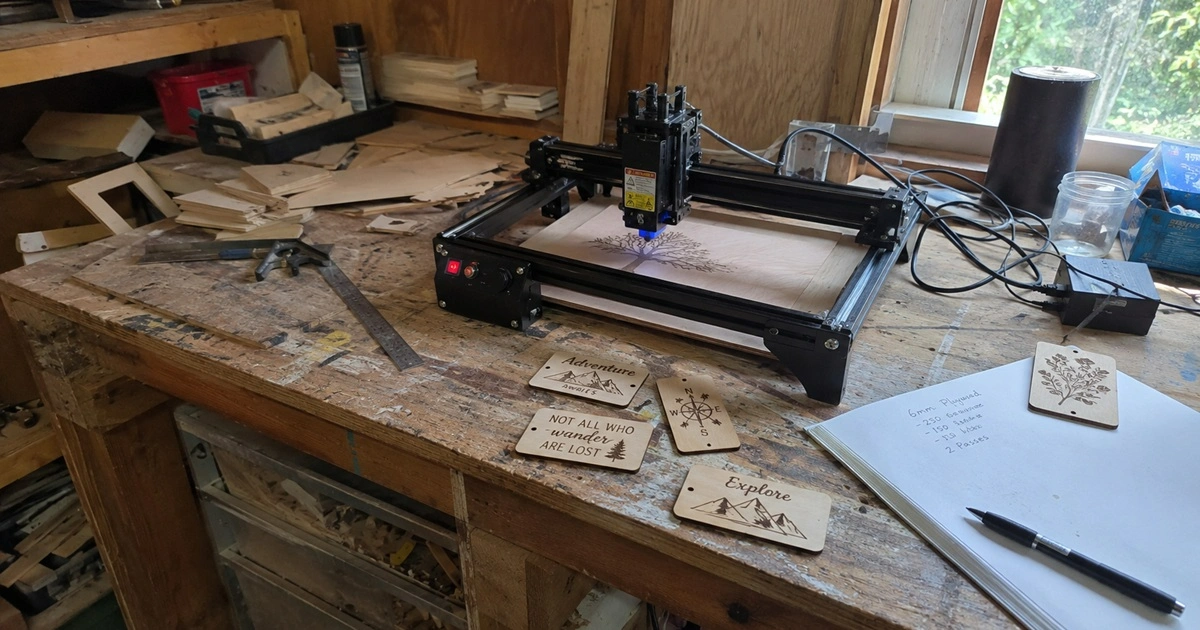
Most people buy a laser engraver because they have a specific project in mind. That was true for me too.
I originally wanted one for woodworking projects. The idea was simple: make custom signs, add logos to furniture, and experiment with personalized gifts.
A few months later, I noticed something strange. The projects that convinced me to buy the machine weren’t the projects I was actually making. Instead of engraving decorative signs every weekend, I was creating storage labels, workshop templates, tool tags, measuring guides, and organizational systems.
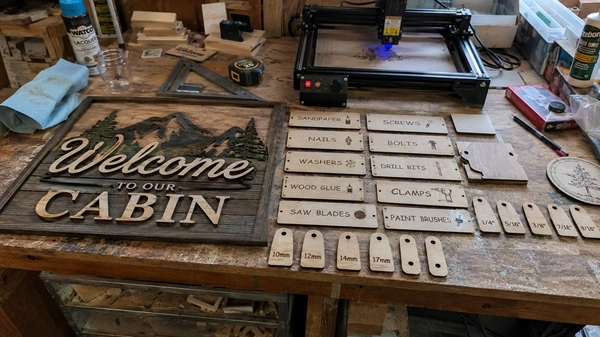
The project that probably justified the cost of my laser engraver wasn’t a custom sign or a gift. It was a sheet of labels for my hardware drawers. That sounds boring. It was also surprisingly useful.
A laser engraver becomes one of the most-used tools in a DIY workshop because it removes everyday friction.Instead of being used only for decorative projects, it quickly turns into a practical tool for labels, templates, jigs, and workshop organization.
Over time, it shifts from a “creative gadget” into a workflow tool that solves small but constant workshop problems.

What I Thought I’d Use a Laser Engraver For vs. What I Actually Used It For
Three months into ownership, my project list looked nothing like what I expected.
That shift completely changed how I viewed the machine.
I stopped thinking about it as a creative tool and started treating it as a workshop utility.
The First Projects Were Things I Wanted. The Later Projects Were Things I Needed.
Looking back, there was a clear pattern.
Early Projects
- Family name sign
- Personalized cutting board
- Decorative wall piece
- Custom coaster set
- Gift plaque
Later Projects
- Drawer labels
- Tool markers
- Router templates
- Cable tags
- Drill bit organizers
- Storage bin labels
- Measuring guides
The first projects were fun. The later projects solved actual problems. That’s when the laser engraver became useful enough to earn permanent space on my workbench.
The Workshop Organization Benefit Nobody Talks About
Every DIY workshop eventually reaches the same stage.
More tools. More materials. More hardware. More clutter.
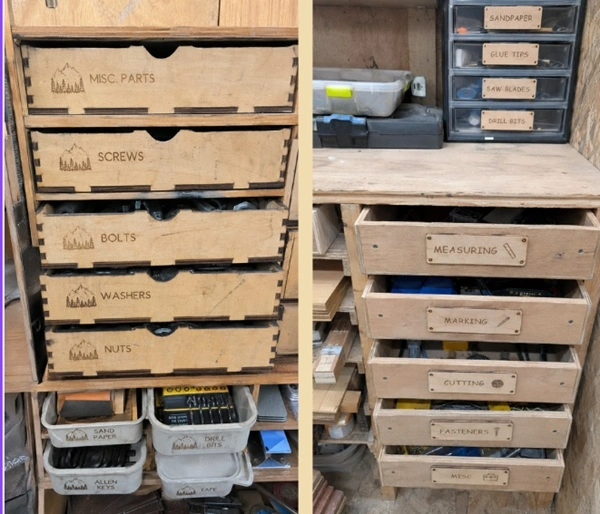
Finding things starts taking longer than using them. One of the first genuinely practical projects I completed was labeling every hardware drawer in my workshop. It wasn’t exciting. It also saved me from opening six different bins every time I needed a specific screw size.
Since then, I’ve used the laser engraver for:
- Hardware drawer labels
- Tool cabinet identification tags
- Router bit storage labels
- Measuring references
- Material storage markers
- Workshop safety reminders
These projects won’t get many likes on social media.
They’re the ones I end up using every day.

The Difference Between a Finished Project and a Finished-Looking Project
One thing I didn’t expect was how often laser engraving became the final step of a project.
A cabinet can be built perfectly and still look unfinished. A jig can work flawlessly and still feel temporary. Small details change that.
I’ve used laser engraving to add:
- Measurement scales
- Alignment markings
- Project labels
- Custom logos
- Drawer identifiers
- Decorative accents
They’re minor additions, but they often make DIY projects feel more intentional and professional.
How It Changed My Workflow
This is probably the biggest benefit and the one that gets overlooked in most reviews.
Once I started building reusable templates and label layouts, I stopped recreating the same designs over and over.
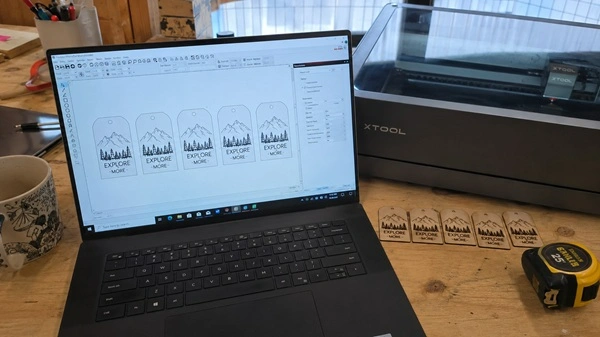
Using LightBurn, I built a small folder of common workshop templates:
- Cable tags
- Drawer labels
- Tool markers
- Plant labels
- Measurement guides
Whenever I needed another batch, I could open the file, duplicate the design, and run the job.
A task that once took half an hour now takes a few minutes. The time savings weren’t dramatic on any single project. Over dozens of projects, they added up quickly.
The Frustrations I Wish More Reviews Mentioned
Laser engravers are incredibly useful.
They’re also not nearly as effortless as some YouTube videos make them look.
My First Month Was Full of Mistakes
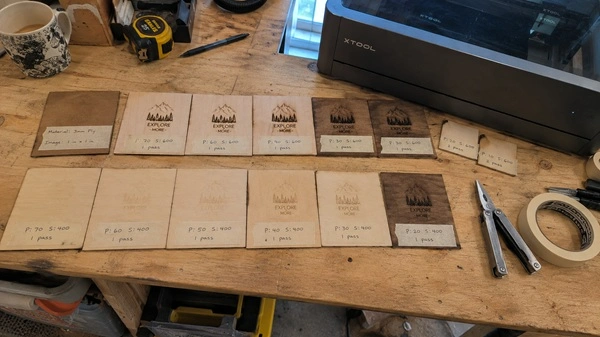
One of my earliest engraving attempts was on a sheet of birch plywood. I copied settings from a video without testing them first. The result was a dark burn ring around every letter and a ruined workpiece. I ended up wasting several blanks before I learned to run test grids and dial in settings properly.
I also underestimated ventilation. The first time I engraved indoors, I quickly realized that smoke management wasn’t optional. It’s one of those realities that rarely gets mentioned in promotional content.
Common Ownership Friction
None of these are deal-breakers.
But they’re part of ownership and worth knowing before buying.
The Unexpected Money-Saving Side Effect
I didn’t buy a laser engraver to save money. Over time, though, I noticed how many small purchases disappeared.
Things I used to order included:
- Custom labels
- Name plates
- Plant markers
- Workshop signs
- Personalized gifts
None of these purchases were expensive on their own. But having the ability to create them immediately became incredibly convenient. The biggest benefit wasn’t saving money. It was avoiding delays.
Why It Stuck in My Workflow
The real turning point wasn’t the first project. It was realizing how often I kept reaching for it during unrelated tasks.
At some point, it stopped being a “creative machine” and started replacing a handful of small workshop tools and manual steps.
- I stopped handwriting labels and started generating reusable ones
- I stopped redrawing templates for repeat builds
- I stopped ordering simple custom tags and just made them myself
That shift is what made it a permanent tool on my workbench. Not because it was impressive, but because it quietly replaced a lot of small steps I used to repeat manually.
Final Thoughts
If you’re thinking about buying a laser engraver, don’t judge it by the showcase projects you see online. Those are the highlight reels, not the daily reality of ownership.
In actual use, it’s less about decorative engraving and more about repetitive workshop work that keeps showing up over and over.
- Labels that stop you from digging through storage bins
- Templates that remove repeated measuring and setup work
- Markings that make tools and jigs easier to use
That’s where most of the value actually sits. Not in the impressive one-off projects, but in the small tasks that quietly repeat in the background of every workshop.
If those are the kinds of problems you deal with, the machine doesn’t stay “occasional use” for long.